
Your SIM card
Keep your own number and plan.
Your SIM must have VoLTE enabled.
BLACKBERRY 10 · NATIVE VOLTE
Your BlackBerry has 4G data but falls back to 2G or 3G for calls? This tool enables 4G calling (VoLTE) on compatible BB10 phones, using your own SIM and built-in dialer. It is experimental: check your phone and carrier before you start.
Download for macOSv0.3.3-r5 · Experimental release · Root access required
Tested on one Q10 setupShort calls in both directions and a normal restart
Keep the familiar dialerUse your own SIM and number
Set up from your computerWindows x64 and universal macOS packages
VoLTE means making calls over your carrier’s 4G network.
This tool enables calling features already in BB10.
It does not provide free calls or an internet calling account.
Keep your own number and plan.
Your SIM must have VoLTE enabled.
Enable BB10’s built-in IMS service.
Files are checked before a separate copy is modified.
Use the phone’s built-in dialer.
Your carrier’s usual charges apply.
Root gives administrator access to the phone. It is needed to enable VoLTE, but you do not need hardware changes or another dialer app.
The original /radio/bin/ims_rrm is not overwritten. Native files are checked against the project’s required hashes before installation.
The tool checks the model, OS, SIM, LTE, network settings and pre-install state. It stops if a required condition is not met.
Use your computer to connect, check and install.
Then make and receive calls on the phone.
A status message alone cannot tell you it works.
Connect and unlock the phone over USB. Choose “Connect phone” (连接手机); if it fails, follow “Connection help” (连接帮助).
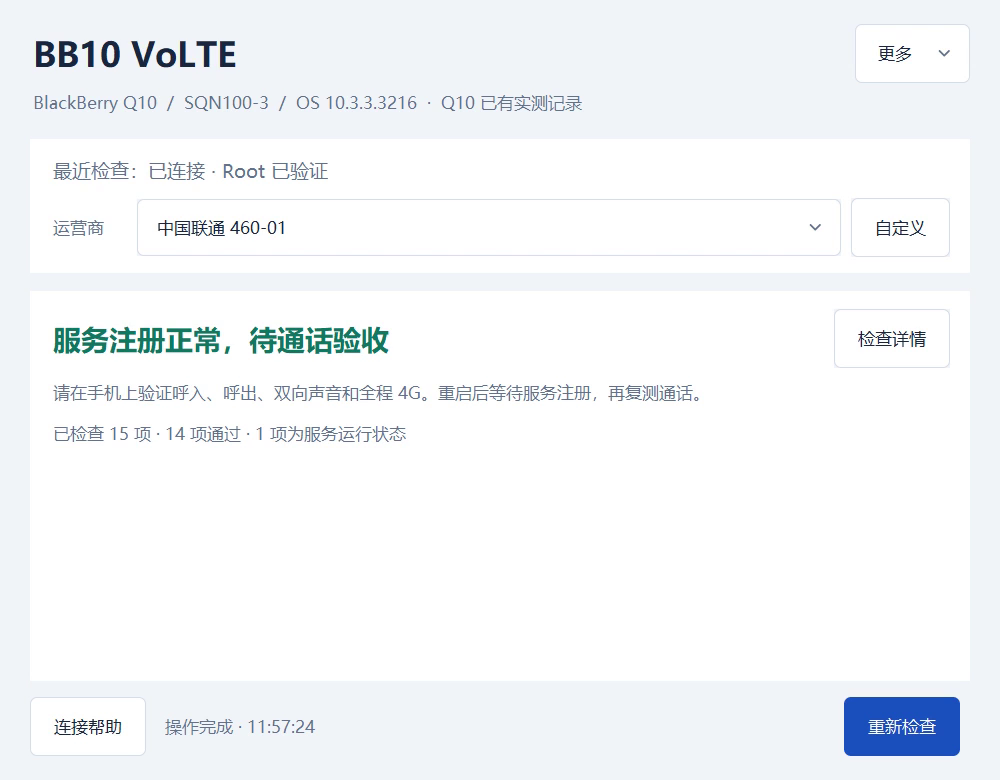
The tool checks the model, OS, root access, native files, SIM and network. Resolve any failed checks before continuing.
Confirm your backup and VoLTE plan, then follow the installation steps. Wait for the phone to register with your carrier’s calling service.
Use the built-in dialer to make and receive calls. Check that both people can hear each other and the phone stays on 4G throughout.
Your post-install call checklist
Test every item yourself.
The tool will not place calls for you.
Setup with recorded phone testsQ10 SQN100-3 · OS 10.3.3.3216 · China Unicom, Beijing · 460-01
Short calls and a normal restart only; not a guarantee of long-term reliability or support for other setups.This is still experimental, with no universal guarantee.
Your exact model, OS version, SIM and carrier
all affect whether it will work.
SQN100-3 + OS 10.3.3.3216 + China Unicom Beijing (460-01): short calls in both directions and a normal restart tested. This does not cover every Q10.
This tool has not completed call testing on a Q20. Continue only if you explicitly enable experimental use and every technical check passes.
Network recovery after disabling still needs validation. Checks and report export are available, but automatic install, update, start and restore are paused.
Current public release
v0.3.3-r5 · Experimental prerelease
Windows 10 / 11 · x64 · Portable EXE
Download and open the EXE. Required components are included; no separate Python or OpenSSH installation is needed.
The EXE is not Authenticode-signed. Verify its checksum before running it. Launch testing has mainly been on Windows 11 x64.Apple Silicon + Intel · Universal DMG
Open the DMG, drag the app to Applications, then launch it. Python and Tk are included; SSH/SCP use the versions built into macOS.
The app and DMG are signed and notarized. The package includes Intel binaries, but has not been run on an Intel Mac for validation.Prefer to run from source?Install Python 3.14 with Tk, then run python tools/gui.py.
Help other BlackBerry owners discover the project.
Whether it worked or failed, your model and test results can help.
For step-by-step setup, installation,
recovery and troubleshooting, open the guide.
No. Recorded phone testing covers Q10 SQN100-3 with OS 10.3.3.3216 and China Unicom Beijing (460-01). Other Q10 variants and Q20 are experimental only after all checks pass. Automatic install, update, start and restore are paused for Passport / Q30.
Yes. Root means administrator access to the phone. If you already have matching root access and trusted SSH, you do not need to flash again. Unrooted Q10 phones can use the first-time preparation wizard, but flashing erases data and this workflow remains experimental. Back up first.
No. It is not an internet calling service and does not offer free calls. You keep your SIM, number and plan, and your carrier’s charges apply. Your SIM needs VoLTE enabled and working 4G data. This project does not unlock SIMs.
Not necessarily. It only means the phone has registered with the carrier’s calling service. Test outgoing and incoming calls, audio in both directions and 4G throughout, then repeat unplugged and after a normal restart. Long-term reliability and emergency calls are not fully validated. Do not rely on it as your only way to make emergency calls.
Not for the Windows EXE or macOS DMG. You only need to install Python 3.14 with Tk if you run from source. Download the package and its matching SHA-256 file from the same release.
No. When you choose to export, the tool saves a redacted check report locally. It does not upload it. Review the report before sharing, and do not include the private folder, private keys or private installation records.